Showing posts with label mtn. Show all posts
Showing posts with label mtn. Show all posts
Saturday, April 22, 2017
MTN Free Call
MTN Free Call

Wow!!!!!
MTN Nigeria is at it again, you can now make calls on MTN to MTN for FREE.
If you can remember MTN did something like this last month (September) but they were a bit selective, what I meen by that is that it wasn’t applicable to all MTN SIM, but this time around it works on every MTN SIMCard, be it Poatpaid, Prepaid, Old or New in fact Any MTN SIMCard at all!
The truth is that MTN has been considerate these days, but some of us do not want to accept that fact because they believe that nothing good comes from MTN, but the truth is that MTN still remain the best Telecommunication in Nigeria.

How do I subscribe?
Just dial following codes;
· *567*3*5*2# 200 naira will be deducted and you will be given 2 hours worth of free call everyday for good 1week
· *567*3*6# 100 naira will be deducted and you will be given 39 minutes worth of free call everyday for 1week
· *567*3*7# 75 naira will be deducted and you will be given 15 minutes worth of free call everyday for 1week
· *567*3*8# 50 naira will be deducted and you will be given 9 minutes worth of free call everyday for 1week.
These codes are working perfectly at the time of post.
If you like our post and wish to get updates straight to your mail, subscribe to our email update.
Available link for download

Thursday, March 2, 2017
MTN to MTN Free Call
MTN to MTN Free Call
Updated
If you are using MTN and you have not activated the MTN to MTN free calls then you must be missing out.
This is the best promo so far in the history of Nigeria Telecom Industry.
I previously wrote about this promo which stated in detail how this promo works, yet lots of people still get it wrong.
Let me make it clear once again.
 This promo is not an unlimited free call like some people think, rather it has a capped limit for each of the plan you subscribe, though the message you get after your subscription is that you can make MTN to MTN call for as long as you like but the truth is that each of the package has an allocated minutes you can make call per day, this allocated minutes is what you get every day for one week.
eg. when you subscribe the one for N200 you will get 2hours worth of free call everyday for one week, and when subscribe the one of N100 you will get 39 minutes worth of free call everyday for one week, so i recommend you to subscribe the one of N200 to enjoy this promo.
See the full codes below;
- *567*3*5*2# 200 naira will be deducted and you will be given 2 hours worth of free call everyday for good 1week.
- *567*3*6# 100 naira will be deducted and you will be given 39 minutes worth of free call everyday for 1week.
- *567*3*7# 75 naira will be deducted and you will be given 15 minutes worth of free call everyday for 1week.
- *567*3*8# 50 naira will be deducted and you will be given 9 minutes worth of free call everyday for 1week.
Available link for download
Tuesday, February 7, 2017
MTN BIS with Simple Server Get 5GB for just 70
MTN BIS with Simple Server Get 5GB for just 70
MTN is blazing with BIS, download up to 5GB for just #70, Yes you heard me right, just #70 you can browse and download movies worth 5GB with up to 900kb per/sec .

Just sit back and relax while I pilot you through this tutorial.
I hate it when people complain paying heavy for browsing, why would you want to pay heavy when you can exploit MTN by using this method am about to share with you.
Now lets get started:
subscribe to any of the MTN Blackberry plans
For one day plan (Text BBLITED to 21600) #70
For one week plan (Text BBLITEW to 21600) #350
For one month plan (Text BBLITEM to 21600) #1000
After which you set your Android device connections to:
APN: web.gprs.mtnnigeria.net
Ip Address: 127.0.0.1
Port: 8080
For Android Device Users, proceed by Download the Android SimpleServer
SimpleServer Settings
Install it and go to your Simple Server settings and configure it this way below:
Pdproxy host: 10.199.212.2
Proxy port: 8080
Injection method: get Injection
Querry/url: http://web.blackberry.com
Injection host: web.blackberry.com
Injection line press your keyboard enter key 4times
Log level: debug
Close and connect to the internet and watch your browsing speed.
You might be wondering whether it works on just Opera Mini but it also works with UCbrowser, and Google Play Store. And also watching of video is applicable.
Do you want it to power all your applications, just download ProxyDroid and then enter the following configuration.
Full Configuration on ProxyDroid
Symbian users who what to surf with SimpleServer should use the same settings
For PC Users:
Download and extract Mtn_simple_server.zip to a new folder on your Desktop background
Configure Your Modem as Follow:
Configure Your Mozilla Firefox or Opera Mini as follows;
- Host: 127.0.0.1
- Port: 8080
Symbian users who what to surf with SimpleServer should use the same settings
For PC Users:
Download and extract Mtn_simple_server.zip to a new folder on your Desktop background
Configure Your Modem as Follow:
- APN: web.gprs.mtnnigeria.net
- Username & Password: leave them blank
Configure Your Mozilla Firefox or Opera Mini as follows;
- IP: 127.0.0.1 PORT: 8080
- Remember to tick: Use this proxy server for all protocols

Full Configuration on ProxyDroid
Host: 127.0.0.1
Port: 8080
Just close because you are done.
Symbian users who what to surf with SimpleServer should use the same settings
For PC Users:
Download and extract Mtn_simple_server.zip to a new folder on your Desktop background
Configure Your Modem as Follow:
APN: web.gprs.mtnnigeria.net
Username & Password: leave them blank
Open the file you extracted, double-click "SimpleServer.exe"and make sure is always on open.
Configure Your Mozilla Firefox or Opera Mini as follows;
IP: 127.0.0.1 PORT: 8080
Remember to tick: Use this proxy server for all protocols
Yesterday I made a post on how to use Mtn Bis with Android phones and PC via DroidVPN and PD-Proxy, Im not yet happy when I saw users comments complaining that they are already subscribed to Mtn Bis but the VPN refused to connect, why some complain about 100MB limit for VPN free users, Now we have sourced for another means to enjoy Mtn Bis on both PC and Android phone even without required VPN subscription before you can enjoy Mtn Bis to the fullest. SimpleServer VPN is what am talking about, it works faster at the rate of 500k and above. To have a better surfing with SimpleServer I expect you to have a working Mtn Blackberry Plan.
After which you set your device connections to:
SimpleServer Settings
Install it and go to your Simple Server settings and configure it this way below:
Do you want it to power all your applications, just download ProxyDroid and then enter the following configuration.
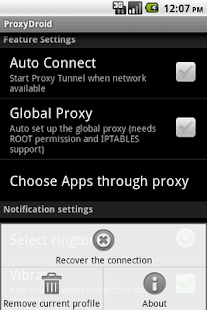 Full Configuration on ProxyDroid
Symbian users who what to surf with SimpleServer should use the same settings
For PC Users:
Download and extract Mtn_simple_server.zip to a new folder on your Desktop background
Configure Your Modem as Follow:
Configure Your Mozilla Firefox or Opera Mini as follows;
After which you set your device connections to:
- APN: web.gprs.mtnnigeria.net
- Ip Address: 127.0.0.1
- Port: 8080
SimpleServer Settings
Install it and go to your Simple Server settings and configure it this way below:
- Pdproxy host: 10.199.212.2
- Proxy port: 8080
- Injection method: get Injection
- Querry/url: http://web.blackberry.com
- Injection host: web.blackberry.com
- Injection line press your keyboard enter key 4times
- Log level: debug
- Close and connect to the internet and watch your browsing speed.
Do you want it to power all your applications, just download ProxyDroid and then enter the following configuration.
- Host: 127.0.0.1
- Port: 8080
Symbian users who what to surf with SimpleServer should use the same settings
For PC Users:
Download and extract Mtn_simple_server.zip to a new folder on your Desktop background
Configure Your Modem as Follow:
- APN: web.gprs.mtnnigeria.net
- Username & Password: leave them blank
Configure Your Mozilla Firefox or Opera Mini as follows;
- IP: 127.0.0.1 PORT: 8080
- Remember to tick: Use this proxy server for all protocols
Yesterday I made a post on how to use Mtn Bis with Android phones and PC via DroidVPN and PD-Proxy, Im not yet happy when I saw users comments complaining that they are already subscribed to Mtn Bis but the VPN refused to connect, why some complain about 100MB limit for VPN free users, Now we have sourced for another means to enjoy Mtn Bis on both PC and Android phone even without required VPN subscription before you can enjoy Mtn Bis to the fullest. SimpleServer VPN is what am talking about, it works faster at the rate of 500k and above. To have a better surfing with SimpleServer I expect you to have a working Mtn Blackberry Plan.
After which you set your device connections to:
SimpleServer Settings
Install it and go to your Simple Server settings and configure it this way below:
Do you want it to power all your applications, just download ProxyDroid and then enter the following configuration.
Full Configuration on ProxyDroid
Symbian users who what to surf with SimpleServer should use the same settings
For PC Users:
Download and extract Mtn_simple_server.zip to a new folder on your Desktop background
Configure Your Modem as Follow:
Configure Your Mozilla Firefox or Opera Mini as follows;
After which you set your device connections to:
- APN: web.gprs.mtnnigeria.net
- Ip Address: 127.0.0.1
- Port: 8080
SimpleServer Settings
Install it and go to your Simple Server settings and configure it this way below:
- Pdproxy host: 10.199.212.2
- Proxy port: 8080
- Injection method: get Injection
- Querry/url: http://web.blackberry.com
- Injection host: web.blackberry.com
- Injection line press your keyboard enter key 4times
- Log level: debug
- Close and connect to the internet and watch your browsing speed.
Do you want it to power all your applications, just download ProxyDroid and then enter the following configuration.
- Host: 127.0.0.1
- Port: 8080
Symbian users who what to surf with SimpleServer should use the same settings
For PC Users:
Download and extract Mtn_simple_server.zip to a new folder on your Desktop background
Configure Your Modem as Follow:
- APN: web.gprs.mtnnigeria.net
- Username & Password: leave them blank
Configure Your Mozilla Firefox or Opera Mini as follows;
- IP: 127.0.0.1 PORT: 8080
- Remember to tick: Use this proxy server for all protocols
Available link for download
Subscribe to:
Posts (Atom)