Showing posts with label get. Show all posts
Showing posts with label get. Show all posts
Friday, February 17, 2017
Micromax USB Driver Download – Get Drivers For Micromax Smartphones
Micromax USB Driver Download – Get Drivers For Micromax Smartphones
Micromax USB Driver Download – Get Drivers For Micromax Smartphones!

Micromax USB drivers are required by users for connecting their Micromax smartphone to the computer. When you install the required USB drivers on your computer, there won’t be any need of PC suite to connect your device to the computer.
Even though using a PC suite would make the users to easily connect with PC, Micromax doesn’t have one at this time of writing. Instead of PC suite, Micromax have released USB drivers officially for all their smartphones.
Here in this page you will find the USB drivers of all Micromax android devices.

Micromax USB Driver Download:
| Micromax Device Model | USB Drivers |
| Micromax A1-------------------------------------------------------------- | Download |
| Micromax A25------------------------------------------------------------- | Download |
| Micromax A24------------------------------------------------------------- | Download |
| Micromax A27------------------------------------------------------------- | Download |
| Micromax A26------------------------------------------------------------- | Download |
| Micromax A30------------------------------------------------------------- | Download |
| Micromax A28------------------------------------------------------------- | Download |
| Micromax A35------------------------------------------------------------- | Download |
| Micromax A34------------------------------------------------------------- | Download |
| Micromax A37------------------------------------------------------------- | Download |
| Micromax A36------------------------------------------------------------- | Download |
| Micromax A40------------------------------------------------------------- | Download |
| Micromax A37B----------------------------------------------------------- | Download |
| Micromax A45------------------------------------------------------------- | Download |
| Micromax A44------------------------------------------------------------- | Download |
| Micromax A47------------------------------------------------------------- | Download |
| Micromax A46------------------------------------------------------------- | Download |
| Micromax A51------------------------------------------------------------- | Download |
| Micromax A50------------------------------------------------------------- | Download |
| Micromax A54------------------------------------------------------------- | Download |
| Micromax A52------------------------------------------------------------- | Download |
| Micromax A065----------------------------------------------------------- | Download |
| Micromax A56------------------------------------------------------------- | Download |
| Micromax A55------------------------------------------------------------- | Download |
| Micromax A58------------------------------------------------------------- | Download |
| Micromax A57------------------------------------------------------------- | Download |
| Micromax A60------------------------------------------------------------- | Download |
| Micromax A59------------------------------------------------------------- | Download |
| Micromax A62------------------------------------------------------------- | Download |
| Micromax A61------------------------------------------------------------- | Download |
| Micromax A064------------------------------------------------------------ | Download |
| Micromax A63------------------------------------------------------------- | Download |
| Micromax A66------------------------------------------------------------- | Download |
| Micromax A65------------------------------------------------------------- | Download |
| Micromax A67------------------------------------------------------------- | Download |
| Micromax A066------------------------------------------------------------ | Download |
| Micromax A68------------------------------------------------------------- | Download |
| Micromax A067------------------------------------------------------------ | Download |
| Micromax A69------------------------------------------------------------- | Download |
| Micromax A068------------------------------------------------------------ | Download |
| Micromax A70------------------------------------------------------------- | Download |
| Micromax A069------------------------------------------------------------ | Download |
| Micromax A72------------------------------------------------------------- | Download |
| Micromax A71------------------------------------------------------------- | Download |
| Micromax A74------------------------------------------------------------- | Download |
| Micromax A73------------------------------------------------------------- | Download |
| Micromax A075------------------------------------------------------------ | Download |
| Micromax A75------------------------------------------------------------- | Download |
| Micromax A77------------------------------------------------------------- | Download |
| Micromax A76------------------------------------------------------------- | Download |
| Micromax A82------------------------------------------------------------- | Download |
| Micromax A80------------------------------------------------------------- | Download |
| Micromax A84------------------------------------------------------------- | Download |
| Micromax A082------------------------------------------------------------ | Download |
| Micromax A87------------------------------------------------------------- | Download |
| Micromax A85------------------------------------------------------------- | Download |
| Micromax A89------------------------------------------------------------- | Download |
| Micromax A88------------------------------------------------------------- | Download |
| Micromax A90------------------------------------------------------------- | Download |
| Micromax A089------------------------------------------------------------ | Download |
| Micromax A91------------------------------------------------------------- | Download |
| Micromax A90s------------------------------------------------------------ | Download |
| Micromax A92------------------------------------------------------------- | Download |
| Micromax A091------------------------------------------------------------ | Download |
| Micromax A93------------------------------------------------------------- | Download |
| Micromax A092------------------------------------------------------------ | Download |
| Micromax A94------------------------------------------------------------- | Download |
| Micromax A093------------------------------------------------------------ | Download |
| Micromax A99------------------------------------------------------------- | Download |
| Micromax A96------------------------------------------------------------- | Download |
| Micromax A102------------------------------------------------------------ | Download |
| Micromax A100------------------------------------------------------------ | Download |
| Micromax A105------------------------------------------------------------ | Download |
| Micromax A104------------------------------------------------------------ | Download |
| Micromax A108------------------------------------------------------------ | Download |
| Micromax A106------------------------------------------------------------ | Download |
| Micromax A110Q---------------------------------------------------------- | Download |
| Micromax A110------------------------------------------------------------ | Download |
| Micromax A113------------------------------------------------------------ | Download |
| Micromax A111------------------------------------------------------------ | Download |
| Micromax A115------------------------------------------------------------ | Download |
| Micromax A114------------------------------------------------------------ | Download |
| Micromax A116I----------------------------------------------------------- | Download |
| Micromax A116------------------------------------------------------------ | Download |
| Micromax A119------------------------------------------------------------ | Download |
| Micromax A117------------------------------------------------------------ | Download |
| Micromax A121------------------------------------------------------------ | Download |
| Micromax A120------------------------------------------------------------ | Download |
| Micromax A200------------------------------------------------------------ | Download |
| Micromax A190------------------------------------------------------------ | Download |
| Micromax A240------------------------------------------------------------ | Download |
| Micromax A210------------------------------------------------------------ | Download |
| Micromax A290------------------------------------------------------------ | Download |
| Micromax A250------------------------------------------------------------ | Download |
| Micromax A310------------------------------------------------------------ | Download |
| Micromax A300------------------------------------------------------------ | Download |
| Micromax A315------------------------------------------------------------ | Download |
| Micromax A311------------------------------------------------------------ | Download |
| Micromax AD4500-------------------------------------------------------- | Download |
| Micromax A350------------------------------------------------------------ | Download |
| Micromax AQ4501--------------------------------------------------------- | Download |
| Micromax AE90------------------------------------------------------------ | Download |
| Micromax Canvas Hue---------------------------------------------------- | Download |
| Micromax AQ5001--------------------------------------------------------- | Download |
| Micromax D320------------------------------------------------------------ | Download |
| Micromax Canvas Selfie--------------------------------------------------- | Download |
| Micromax EG111----------------------------------------------------------- | Download |
| Micromax D321------------------------------------------------------------ | Download |
| Micromax P250------------------------------------------------------------ | Download |
| Micromax EG116---------------------------------------------------------- | Download |
| Micromax P256------------------------------------------------------------ | Download |
| Micromax P255------------------------------------------------------------ | Download |
| Micromax P280------------------------------------------------------------ | Download |
| Micromax P275------------------------------------------------------------ | Download |
| Micromax P310------------------------------------------------------------ | Download |
| Micromax P300------------------------------------------------------------ | Download |
| Micromax P360------------------------------------------------------------ | Download |
| Micromax P350------------------------------------------------------------ | Download |
| Micromax P365------------------------------------------------------------ | Download |
| Micromax P362------------------------------------------------------------ | Download |
| Micromax P410i------------------------------------------------------------ | Download |
| Micromax P410------------------------------------------------------------ | Download |
| Micromax P550------------------------------------------------------------ | Download |
| Micromax P500------------------------------------------------------------ | Download |
| Micromax P580------------------------------------------------------------ | Download |
| Micromax P560------------------------------------------------------------ | Download |
| Micromax P650------------------------------------------------------------ | Download |
| Micromax P600------------------------------------------------------------ | Download |
| Micromax P666------------------------------------------------------------ | Download |
| Micromax P650e------------------------------------------------------------ | Download |
| Micromax Q355------------------------------------------------------------ | Download |
| Micromax Q324------------------------------------------------------------ | Download |
| Micromax Q372------------------------------------------------------------ | Download |
| Micromax Q371------------------------------------------------------------ | Download |
| Micromax MT500---------------------------------------------------------- | Download |
| Micromax Q380------------------------------------------------------------ | Download |
| Micromax S300 ------------------------------------------------------------ | Download |
Note:
1) Micromax doesn’t have a PC suite for its customers at this moment. So if you would ever want to connect your Micromax Android smartphone to the connect, you have to download the appropriate USB driver given above and install it. Otherwise, you won’t be able to connect your smartphone to the PC or laptop.
2) All the USB drivers we have given above are from Micromax. So, if you face any sort of issues with these drivers, please contact the Micromax support team and get them cleared.
3) The Micromax USB drivers we have given in this page are uploaded on Google Drive. If you encounter any sort of issues while download these drivers, do let us know so that we can use some mirror sites for downloading the files.
5) If in case you are looking for Original firmware of Micromax devices, check outMicromax Stock ROM for all models!
6) All the USB drivers in this page comes with an .exe executable file. Just click on it to install the USB driver and connect your Micromax device with the computer successfully.
Available link for download

Tuesday, February 7, 2017
MTN BIS with Simple Server Get 5GB for just 70
MTN BIS with Simple Server Get 5GB for just 70
MTN is blazing with BIS, download up to 5GB for just #70, Yes you heard me right, just #70 you can browse and download movies worth 5GB with up to 900kb per/sec .

Just sit back and relax while I pilot you through this tutorial.
I hate it when people complain paying heavy for browsing, why would you want to pay heavy when you can exploit MTN by using this method am about to share with you.
Now lets get started:
subscribe to any of the MTN Blackberry plans
For one day plan (Text BBLITED to 21600) #70
For one week plan (Text BBLITEW to 21600) #350
For one month plan (Text BBLITEM to 21600) #1000
After which you set your Android device connections to:
APN: web.gprs.mtnnigeria.net
Ip Address: 127.0.0.1
Port: 8080
For Android Device Users, proceed by Download the Android SimpleServer
SimpleServer Settings
Install it and go to your Simple Server settings and configure it this way below:
Pdproxy host: 10.199.212.2
Proxy port: 8080
Injection method: get Injection
Querry/url: http://web.blackberry.com
Injection host: web.blackberry.com
Injection line press your keyboard enter key 4times
Log level: debug
Close and connect to the internet and watch your browsing speed.
You might be wondering whether it works on just Opera Mini but it also works with UCbrowser, and Google Play Store. And also watching of video is applicable.
Do you want it to power all your applications, just download ProxyDroid and then enter the following configuration.
Full Configuration on ProxyDroid
Symbian users who what to surf with SimpleServer should use the same settings
For PC Users:
Download and extract Mtn_simple_server.zip to a new folder on your Desktop background
Configure Your Modem as Follow:
Configure Your Mozilla Firefox or Opera Mini as follows;
- Host: 127.0.0.1
- Port: 8080
Symbian users who what to surf with SimpleServer should use the same settings
For PC Users:
Download and extract Mtn_simple_server.zip to a new folder on your Desktop background
Configure Your Modem as Follow:
- APN: web.gprs.mtnnigeria.net
- Username & Password: leave them blank
Configure Your Mozilla Firefox or Opera Mini as follows;
- IP: 127.0.0.1 PORT: 8080
- Remember to tick: Use this proxy server for all protocols

Full Configuration on ProxyDroid
Host: 127.0.0.1
Port: 8080
Just close because you are done.
Symbian users who what to surf with SimpleServer should use the same settings
For PC Users:
Download and extract Mtn_simple_server.zip to a new folder on your Desktop background
Configure Your Modem as Follow:
APN: web.gprs.mtnnigeria.net
Username & Password: leave them blank
Open the file you extracted, double-click "SimpleServer.exe"and make sure is always on open.
Configure Your Mozilla Firefox or Opera Mini as follows;
IP: 127.0.0.1 PORT: 8080
Remember to tick: Use this proxy server for all protocols
Yesterday I made a post on how to use Mtn Bis with Android phones and PC via DroidVPN and PD-Proxy, Im not yet happy when I saw users comments complaining that they are already subscribed to Mtn Bis but the VPN refused to connect, why some complain about 100MB limit for VPN free users, Now we have sourced for another means to enjoy Mtn Bis on both PC and Android phone even without required VPN subscription before you can enjoy Mtn Bis to the fullest. SimpleServer VPN is what am talking about, it works faster at the rate of 500k and above. To have a better surfing with SimpleServer I expect you to have a working Mtn Blackberry Plan.
After which you set your device connections to:
SimpleServer Settings
Install it and go to your Simple Server settings and configure it this way below:
Do you want it to power all your applications, just download ProxyDroid and then enter the following configuration.
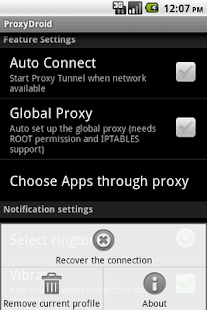 Full Configuration on ProxyDroid
Symbian users who what to surf with SimpleServer should use the same settings
For PC Users:
Download and extract Mtn_simple_server.zip to a new folder on your Desktop background
Configure Your Modem as Follow:
Configure Your Mozilla Firefox or Opera Mini as follows;
After which you set your device connections to:
- APN: web.gprs.mtnnigeria.net
- Ip Address: 127.0.0.1
- Port: 8080
SimpleServer Settings
Install it and go to your Simple Server settings and configure it this way below:
- Pdproxy host: 10.199.212.2
- Proxy port: 8080
- Injection method: get Injection
- Querry/url: http://web.blackberry.com
- Injection host: web.blackberry.com
- Injection line press your keyboard enter key 4times
- Log level: debug
- Close and connect to the internet and watch your browsing speed.
Do you want it to power all your applications, just download ProxyDroid and then enter the following configuration.
- Host: 127.0.0.1
- Port: 8080
Symbian users who what to surf with SimpleServer should use the same settings
For PC Users:
Download and extract Mtn_simple_server.zip to a new folder on your Desktop background
Configure Your Modem as Follow:
- APN: web.gprs.mtnnigeria.net
- Username & Password: leave them blank
Configure Your Mozilla Firefox or Opera Mini as follows;
- IP: 127.0.0.1 PORT: 8080
- Remember to tick: Use this proxy server for all protocols
Yesterday I made a post on how to use Mtn Bis with Android phones and PC via DroidVPN and PD-Proxy, Im not yet happy when I saw users comments complaining that they are already subscribed to Mtn Bis but the VPN refused to connect, why some complain about 100MB limit for VPN free users, Now we have sourced for another means to enjoy Mtn Bis on both PC and Android phone even without required VPN subscription before you can enjoy Mtn Bis to the fullest. SimpleServer VPN is what am talking about, it works faster at the rate of 500k and above. To have a better surfing with SimpleServer I expect you to have a working Mtn Blackberry Plan.
After which you set your device connections to:
SimpleServer Settings
Install it and go to your Simple Server settings and configure it this way below:
Do you want it to power all your applications, just download ProxyDroid and then enter the following configuration.
Full Configuration on ProxyDroid
Symbian users who what to surf with SimpleServer should use the same settings
For PC Users:
Download and extract Mtn_simple_server.zip to a new folder on your Desktop background
Configure Your Modem as Follow:
Configure Your Mozilla Firefox or Opera Mini as follows;
After which you set your device connections to:
- APN: web.gprs.mtnnigeria.net
- Ip Address: 127.0.0.1
- Port: 8080
SimpleServer Settings
Install it and go to your Simple Server settings and configure it this way below:
- Pdproxy host: 10.199.212.2
- Proxy port: 8080
- Injection method: get Injection
- Querry/url: http://web.blackberry.com
- Injection host: web.blackberry.com
- Injection line press your keyboard enter key 4times
- Log level: debug
- Close and connect to the internet and watch your browsing speed.
Do you want it to power all your applications, just download ProxyDroid and then enter the following configuration.
- Host: 127.0.0.1
- Port: 8080
Symbian users who what to surf with SimpleServer should use the same settings
For PC Users:
Download and extract Mtn_simple_server.zip to a new folder on your Desktop background
Configure Your Modem as Follow:
- APN: web.gprs.mtnnigeria.net
- Username & Password: leave them blank
Configure Your Mozilla Firefox or Opera Mini as follows;
- IP: 127.0.0.1 PORT: 8080
- Remember to tick: Use this proxy server for all protocols
Available link for download
Saturday, February 4, 2017
Nexus users could get free full size backup in Google Photos
Nexus users could get free full size backup in Google Photos

Nexus users could get free full size backup in Google Photos
Google Photos already offers tremendous value thanks to its unlimited backup feature, but it could get even better, at least if you’re a Nexus user.
 Right now, Google Photos gives you to backup options. The free one gives you unlimited storage, but limits image size to 16MP. This is called “High quality” mode and it means that if you back up images that are larger than 16MP, they are downsized. Google’s smart algorithms also tweak the image quality to reduce the size of the file. In most cases, the result is a slightly smaller image that’s very close to the original.
The second option is “Original,” and it does what the name says. Your files are backed up without any alteration. But Original isn’t free and unlimited – images you upload in this mode count against your Drive storage quota.
In the future, Nexus users may not have to decide between original quality and unlimited storage. Android Policepeered into the innards of the latest Google Photos update and found references to unlimited original size backup.
“Unlimited free storage for original quality photos & videos uploaded from your Nexus device,” says the feature copy. It’s not clear whether this will include only images taken with Nexus devices or images taken with other devices (like a DSLR camera) and copied over to the Nexus as well. Let’s just say that, if it’s the latter, professional photographers will have a strongincentive to buy a Nexus.
For users who rely on their phones for picture taking, the change may not seem that important. The resolution of current Nexus devices is smaller than 16MP anyway. But choosing Original has the benefit of preserving the fine details of the original shot, and some people care about that.
Free full size backup could be a permanent perk of owning a Nexus or just a temporary promo. We’ll find out if and when Google makes it official!
Available link for download
Tuesday, October 18, 2016
Micromax USB Driver Download – Get Drivers For Micromax Smartphones!
Micromax USB Driver Download – Get Drivers For Micromax Smartphones!
You are here: Home / Micromax USB Driver Download – Get Drivers For Micromax Smartphones! Micromax USB Driver Download – Get Drivers For Micromax Smartphones! Micromax USB drivers are required by users for connecting their Micromax smartphone to the computer. When you install the required USB drivers on your computer, there won’t be any need of PC suite to connect your device to the computer. Even though using a PC suite would make the users to easily connect with PC, Micromax doesn’t have one at this time of writing. Instead of PC suite, Micromax have released USB drivers officially for all their smartphones. Here in this page you will find the USB drivers of all Micromax android devices.

Micromax USB Driver Download:
| Micromax Device Model | USB Drivers |
| Micromax A1 | Download |
| Micromax A25 | Download |
| Micromax A24 | Download |
| Micromax A27 | Download |
| Micromax A26 | Download |
| Micromax A30 | Download |
| Micromax A28 | Download |
| Micromax A35 | Download |
| Micromax A34 | Download |
| Micromax A37 | Download |
| Micromax A36 | Download |
| Micromax A40 | Download |
| Micromax A37B | Download |
| Micromax A45 | Download |
| Micromax A44 | Download |
| Micromax A47 | Download |
| Micromax A46 | Download |
| Micromax A51 | Download |
| Micromax A50 | Download |
| Micromax A54 | Download |
| Micromax A52 | Download |
| Micromax A065 | Download |
| Micromax A56 | Download |
| Micromax A55 | Download |
| Micromax A58 | Download |
| Micromax A57 | Download |
| Micromax A60 | Download |
| Micromax A59 | Download |
| Micromax A62 | Download |
| Micromax A61 | Download |
| Micromax A064 | Download |
| Micromax A63 | Download |
| Micromax A66 | Download |
| Micromax A65 | Download |
| Micromax A67 | Download |
| Micromax A066 | Download |
| Micromax A68 | Download |
| Micromax A067 | Download |
| Micromax A69 | Download |
| Micromax A068 | Download |
| Micromax A70 | Download |
| Micromax A069 | Download |
| Micromax A72 | Download |
| Micromax A71 | Download |
| Micromax A74 | Download |
| Micromax A73 | Download |
| Micromax A075 | Download |
| Micromax A75 | Download |
| Micromax A77 | Download |
| Micromax A76 | Download |
| Micromax A82 | Download |
| Micromax A80 | Download |
| Micromax A84 | Download |
| Micromax A082 | Download |
| Micromax A87 | Download |
| Micromax A85 | Download |
| Micromax A89 | Download |
| Micromax A88 | Download |
| Micromax A90 | Download |
| Micromax A089 | Download |
| Micromax A91 | Download |
| Micromax A90s | Download |
| Micromax A92 | Download |
| Micromax A091 | Download |
| Micromax A93 | Download |
| Micromax A092 | Download |
| Micromax A94 | Download |
| Micromax A093 | Download |
| Micromax A99 | Download |
| Micromax A96 | Download |
| Micromax A102 | Download |
| Micromax A100 | Download |
| Micromax A105 | Download |
| Micromax A104 | Download |
| Micromax A108 | Download |
| Micromax A106 | Download |
| Micromax A110Q | Download |
| Micromax A110 | Download |
| Micromax A113 | Download |
| Micromax A111 | Download |
| Micromax A115 | Download |
| Micromax A114 | Download |
| Micromax A116I | Download |
| Micromax A116 | Download |
| Micromax A119 | Download |
| Micromax A117 | Download |
| Micromax A121 | Download |
| Micromax A120 | Download |
| Micromax A200 | Download |
| Micromax A190 | Download |
| Micromax A240 | Download |
| Micromax A210 | Download |
| Micromax A290 | Download |
| Micromax A250 | Download |
| Micromax A310 | Download |
| Micromax A300 | Download |
| Micromax A315 | Download |
| Micromax A311 | Download |
| Micromax AD4500 | Download |
| Micromax A350 | Download |
| Micromax AQ4501 | Download |
| Micromax AE90 | Download |
| Micromax Canvas Hue | Download |
| Micromax AQ5001 | Download |
| Micromax D320 | Download |
| Micromax Canvas Selfie | Download |
| Micromax EG111 | Download |
| Micromax D321 | Download |
| Micromax P250 | Download |
| Micromax EG116 | Download |
| Micromax P256 | Download |
| Micromax P255 | Download |
| Micromax P280 | Download |
| Micromax P275 | Download |
| Micromax P310 | Download |
| Micromax P300 | Download |
| Micromax P360 | Download |
| Micromax P350 | Download |
| Micromax P365 | Download |
| Micromax P362 | Download |
| Micromax P410i | Download |
| Micromax P410 | Download |
| Micromax P550 | Download |
| Micromax P500 | Download |
| Micromax P580 | Download |
| Micromax P560 | Download |
| Micromax P650 | Download |
| Micromax P600 | Download |
| Micromax P666 | Download |
| Micromax P650e | Download |
| Micromax Q355 | Download |
| Micromax Q324 | Download |
| Micromax Q372 | Download |
| Micromax Q371 | Download |
| Micromax MT500 | Download |
| Micromax Q380 | Download |
| Micromax S300 | Download |
Note:
1) Micromax doesn’t have a PC suite for its customers at this moment. So if you would ever want to connect your Micromax Android smartphone to the connect, you have to download the appropriate USB driver given above and install it. Otherwise, you won’t be able to connect your smartphone to the PC or laptop.2) All the USB drivers we have given above are from Micromax. So, if you face any sort of issues with these drivers, please contact the Micromax support team and get them cleared.
3) The Micromax USB drivers we have given in this page are uploaded on Google Drive. If you encounter any sort of issues while download these drivers, do let us know so that we can use some mirror sites for downloading the files.
4) If you would want to root your Micromax android device or would like to install custom ROM firmware visit berryhubsolutions.blogspot.com
5) If in case you are looking for Original firmware of Micromax devices, check out Micromax Stock ROM for all models!
6) All the USB drivers in this page comes with an .exe executable file. Just click on it to install the USB driver and connect your Micromax device with the computer successfully
Available link for download
Subscribe to:
Posts (Atom)