Showing posts with label smokeping. Show all posts
Showing posts with label smokeping. Show all posts
Friday, December 23, 2016
Network Latency SmokePing Ubuntu 12 04
Network Latency SmokePing Ubuntu 12 04
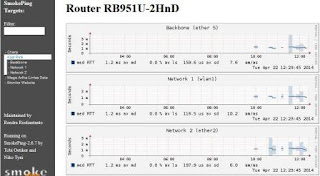
SmokePing adalah tools untuk memantau latency pada jaringan anda.
Berikut beberapa infonya dari Web Resmi SmokePing.
About SmokePing
SmokePing keeps track of your network latency:
- Best of breed latency visualisation.
- Interactive graph explorer.
- Wide range of latency measurment plugins.
- Master/Slave System for distributed measurement.
- Highly configurable alerting system.
- Live Latency Charts with the most ‘interesting’ graphs.
- Free and OpenSource Software written in Perl written by Tobi Oetiker, the creator of MRTG and RRDtool
- Masuk sebagai root
sudo su
- Lakukan penginstallan SmokePing nya.
apt-get install smokeping curl libauthen-radius-perl libnet-ldap-perl libnet-dns-perl libio-socket-ssl-perl libnet-telnet-perl libsocket6-perl libio-socket-inet6-perl apache2 sendmail
- Pindah ke directori /etc/smokeping/config.d
cd /etc/smokeping/config.d
- Modif File General. Backup, Kosongkan file General, kemudian Isi file General.
cp General General.backup
> General
nano General - Isikan dan sesuaikan dengan kondisi anda saat ini.
 *** General ***

owner = Rendra Risdiantanto
contact = rendra.mvi170@gmail.com
mailhost = smtp.gmail.com
cgiurl = http://localhost/cgi-bin/smokeping.cgi
syslogfacility = local0
concurrentprobes = no

@include /etc/smokeping/config.d/pathnames - Modif File Alerts. Backup, Kosongkan file Alerts, kemudian Isi file Alerts.
cp Alerts Alerts.backup
> Alerts
nano Alerts - Isikan dan sesuaikan dengan kondisi anda saat ini.
 *** Alerts ***
to = rendra.mvi170@gmail.com
from = rendra.mvi170@gmail.com

+someloss
type = loss
# in percent
pattern = >0%,*12*,>0%,*12*,>0%
comment = loss 3 times in a row - Modif File Targets. Backup, Kosongkan file Targets, kemudian Isi file Targets.
cp Targets Targets.backup
> Targets
nano Targets - Isikan dan sesuaikan dengan kondisi anda saat ini.
 *** Targets ***

probe = FPing

menu = Top
title = Pantauan Grafik Latency

remark = Selamat Datang di smokeping Latency

+ Kost-Pink
menu = Kost Pink
title = Router RB951U-2HnD
#parents = owner:/Test/James location:/

++ Internet
menu = Backbone
title = Backbone (ether 5)
host = 10.200.20.74
alerts = someloss

++ Network-1
menu = Network 1
title = Network 1 (wlan1)
host = 192.168.5.1
alerts = someloss

++ Network-2
menu = Network 2
title = Network 2 (ether2)
host = 192.168.6.1
alerts = someloss

+ Mega-Artha-Lintas-Data
menu = Mega Artha Lintas Data
title =Mega Artha Lintas Data

++ Gateway
menu = Gateway BTS Minomartani
title = Gateway BTS Minomartani
host = 10.200.20.65
alerts = someloss

++ Radio-Kost-Jelita
menu = AP Kost Jelita
title = Access Point Kost Jelita
host = 10.20.23.8
alerts = someloss

++ CCTV-Merapi

menu = CCTV Merapi
title = CCTV Merapi
host = 192.168.101.2

+ Monitor-Web-Site
menu = Monitor Website
title =Monitor Website

++ Google-co-id
menu = Google.com
title = Google.com
host = google.com
alerts = someloss

++ yahoo-com
menu = Yahoo.com
title = Yahoo.com
host = yahoo.com
alerts = someloss

++ KetoprakDjawir-com

menu = KetoprakDjawir.com
title = KetoprakDjawir.com
host = ketoprakdjawir.com
alerts = someloss

++ Kaskus-co-id

menu = KasKus.co.id
title = KasKus.co.id
host = kaskus.co.id
alerts = someloss

++ ubuntu-com

menu = Ubuntu.com
title = Ubuntu.com
host = ubuntu.com
alerts = someloss

++ kompas-com

menu = Kompas.com
title = Kompas.com
host = kompas.com
alerts = someloss - Restart Tools SmokePing tersebut.
/etc/init.d/smokeping restart
- Buka di browser client http://ip server/cgi-bin/smokeping.cgi
- Dan hasilnya akan seperti ini.

Available link for download

Thursday, November 10, 2016
Network Latency SmokePing Ubuntu 14 04
Network Latency SmokePing Ubuntu 14 04
Berikut beberapa infonya dari Web Resmi SmokePing.
About SmokePing
SmokePing keeps track of your network latency:
- Best of breed latency visualisation.
- Interactive graph explorer.
- Wide range of latency measurment plugins.
- Master/Slave System for distributed measurement.
- Highly configurable alerting system.
- Live Latency Charts with the most ‘interesting’ graphs.
- Free and OpenSource Software written in Perl written by Tobi Oetiker, the creator of MRTG and RRDtool
- Masuk sebagai root.
$ sudo su
- Lakukan penginstallan SmokePing nya.
# apt-get install smokeping apache2 sendmail
- Pindah directory ke /etc/apache2/conf-available
# cd /etc/apache2/conf-available
- Lakukan simbolic atau buat link ke apache2
# ln -s ../../smokeping/apache2.conf smokeping.conf
- Aktifkan config dan mod_cgi
# a2enconf smokeping
# a2enmod cgid - Reload apache2
# service apache2 reload
- Pindah directory ke /etc/smokeping/config.d/
# cd /etc/smokeping/config.d
- Modif File General. Backup, Kosongkan file General, kemudian isi file General.
# cp General General.backup
# > General
nano General - Isikan dan sesuaikan dengan kondisi anda saat ini.
 *** General ***

owner = Rendra Risdiantanto
contact = rendra.mvi170@gmail.com
mailhost = smtp.gmail.com
cgiurl = http://localhost/cgi-bin/smokeping.cgi
syslogfacility = local0

@include /etc/smokeping/config.d/pathnames - Modif File Alerts. Backup, Kosongkan file Alerts, kemudian isi file Alerts.
# cp Alerts Alerts.backup
#> Alerts
#nano Alerts
- Isikan dan sesuaikan dengan kondisi anda saat ini.
 *** Alerts ***
to = rendra.mvi170@gmail.com
from = rendra.mvi170@gmail.com

+someloss
type = loss
# in percent
pattern = >0%,*12*,>0%,*12*,>0%
comment = loss 3 times in a row - Modif File Pathnames. Backup, Kosongkan file Pathnames, kemudian isi file Pathnames.
# cp pathnames pathnames.backup
# > pathnames
# nano pathnames - Isikan dan sesuaikan dengan kondisi anda saat ini.
sendmail = /bin/false
imgcache = /var/cache/smokeping/images
imgurl = ../smokeping/images
datadir = /var/lib/smokeping
piddir = /var/run/smokeping
smokemail = /etc/smokeping/smokemail
tmail = /etc/smokeping/tmail - Modif File Targets. Backup, Kosongkan file Targets, kemudian isi file Targets.
# cp Targets Targets.backup
# > Targets
# nano Targets - Isikan dan sesuaikan dengan kondisi anda saat ini.
 *** Targets ***

probe = FPing

menu = Top
title = Pantauan Grafik Latency

#remark = Selamat Datang di smokeping Latency

+ Ketoprak-Djawir
menu = Ketoprak Djawir
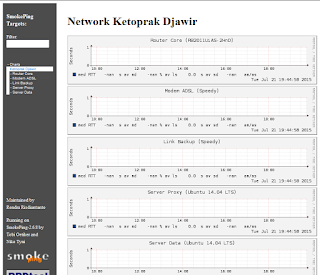
title = Network Ketoprak Djawir

++ Router-Core
menu = Router Core
title = Router Core (RB2011UiAS-2HnD)
host = 192.168.3.1
#alerts = someloss

++ Modem-ADSL-Speedy
menu = Modem ADSL
title = Modem ADSL (Speedy)
host = 192.168.2.1
#alerts = someloss

++ Link-Backup
menu = Link Backup
title = Link Backup (Speedy)
host = 192.168.1.254
#alerts = someloss

++ Server-Proxy
menu = Server Proxy
title = Server Proxy (Ubuntu 14.04 LTS)
host = 192.168.3.2
#alerts = someloss - Reload SmokePing dan Apachenya.
# service smokeping restart
# service apache2 reload - Buka SmokePing di browser client
http://ip-server/cgi-bin/smokeping.cgi
Available link for download
Subscribe to:
Posts (Atom)