Showing posts with label linux. Show all posts
Showing posts with label linux. Show all posts
Sunday, March 26, 2017
Mengatasi Masalah Gagal boot GRUB dual boot Linux ubuntu dengan Windows
Mengatasi Masalah Gagal boot GRUB dual boot Linux ubuntu dengan Windows
sering kali di temui masalah gagal booting dalah dual boot linux ubuntu dan windows setelah instal pertama linux dengan windows atau setelah menginstal ulang kembali windows.
tidak usah khawatir, untuk kasus tidak bisa masuk ke Window karena pas booting langsung ke Linux kita tinggal ketik di terminal
sudo fdisk -l
untuk mengetahui partisi / dev/ kita di linux
sudo mount/dev/sda .... /mnt
isikan ... dengan sda linux kita untuk di isi boot / grub lagi
 |
| partition |
sebagai contoh lihat gambar di atas jadi sda9 untuk partition linux kita
sudo mount/dev/sda9/mnt
sudo grub-install --root-directory=/mnt/dev/sda
sudo update-grub
sudo reboot
GRUB booting windows dan linux akan kembali normal lagi dan biasanya ini terjadi pada Laptop Asus dan sebagian brand lain.
Untuk kasus tidak bisa masuk ke Linux bisa menggunaka cara LiveCD atau bisa juga menggunakan GRUB2 bisa gooleing di mbah goole aja gan
Available link for download

Friday, February 24, 2017
New Skype For Linux Alpha Version Released
New Skype For Linux Alpha Version Released
A new alpha version of Skype for Linux was released today.
Skype for Linux Alpha uses a responsive UI and supports sharing files, photos, and videos, and ships with a new range of emoticons.
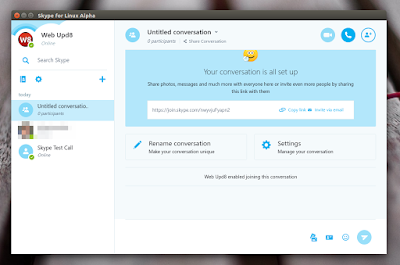
The new version is not fully functional yet and the developers want Linux users to test the app and provide feedback:
"As we develop this new version of Skype for Linux, we need you to test, provide feedback and help us prioritize features. You will notice that with the Alpha version of Skype for Linux, which uses our next generation calling architecture, you will be able to call your friends and family on the latest versions of Skype on Windows, Mac, iOS and Android, but you won’t be able to make or receive calls to and from the previous versions of Skype for Linux (4.3.0.37)".
The announcement also mentions that you can now make one-to-one and group voice calls from a Chromebook or Chrome on Linux, using web.skype.com, this also being in alpha.
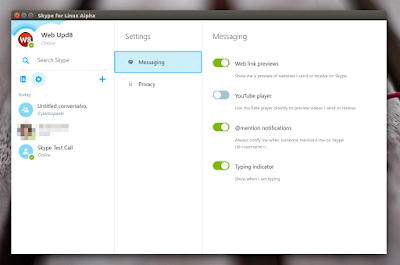
Video and landline calls are also on their way to Chrome for Linux and Chromebooks. Since Skype for Linux Alpha is basically web.skype.com with desktop integration (notifications and a tray icon / appindicator), these features arent yet supported by the new application either.
I should also mention that Skype for Linux Alpha can be installed in parallel with the old Skype version, so theres no need to remove the stable Skype to install it.
Download Skype for Linux Alpha
Download Skype for Linux Alpha (deb and rpm packages available)
For Arch Linux, you can install Skype for Linux Alpha via AUR.

Available link for download
Friday, January 27, 2017
Mtd803f Linux
Mtd803f Linux
Here you can download mtd803f linux for Windows. Its 100% safe, uploaded from safe source and passed Kaspersky virus scan!
Driver Info:
File name: mtd803f-linux.zip
Driver version: 2.0.7
File size: 7 986 KB
OS: Windows 7, Win Vista, Windows 8, Win XP
Upload source: search engine
Available link for download
Saturday, January 21, 2017
New Version Of Linux Email Client Geary Released PPA
New Version Of Linux Email Client Geary Released PPA
Geary is an email client that uses a simple, modern interface, especially created for GNOME 3. Geary 0.11.0, released today, includes new features, improved server compatibility and network reliability, and various bug fixes.
 |
| Geary 0.11.0 in Ubuntu GNOME (GNOME Shell) 16.04 |
Geary features include:
- quick account setup;
- supports Gmail, Yahoo! Mail, Outlook.com, and popular IMAP servers (Dovecot, Cyrus, Zimbra, etc.);
- mail organized by conversations;
- ability to answer directly in conversations or open it in a separate window
- signature support;
- full-featured HTML mail composer;
- fast keyword search with values like from:john;
- desktop notification of new mail.
After Yorba Foundation, the open source company that developed Geary, stopped its activities, the future of the application was unclear. elementary OS, which was using Geary as its default email client, forked the project back in November 2015, continuing its development under the Pantheon Mail name.
In March 2016, Michael Gratton, an old Geary contributor, became an unofficial maintainer (until he can fulfill the GNOME membership application requirements), posting his patches to GNOME Bugzilla while still requiring Adam Dingle, Yorba founder, to commit them.
More about this @ Wikipedia.
 |
| Geary 0.11.0 in Ubuntu (Unity) 16.04 |
Changes in Geary 0.11.0:
- added archive special folder support;
- added is:read, is:unread: is:starred search operators;
- fixed using multiple search operators - to:, from:, etc.;
- work around crashes caused by WebKitGTK+ 2.4.10;
- fixed a crash when searching;
- fixed images not being displayed in some HTML messages;
- fixed empty main window when opened from notification;
- fixed UI freezing when network connections are lost;
- work better with Cyrus & other servers when network unreliable;
- enabled the use of custom FTS3 tokeniser in SQLite 3.12 and later;
- fixed inconsistent Composer Detach button placement;
- documentation improvements;
- updated UI translations.
Install Geary in Ubuntu or Linux Mint
Geary is available in the official Debian / Ubuntu / Linux Mint (and derivatives) repositories - tough its not the latest version -, so to install it, simply use the following command:
sudo apt install gearyThe version available in the official repositories is not the latest 0.11.0. To install Geary 0.11.0 in Ubuntu 16.04, 15.10 or 14.04, Linux Mint 18 or 17.x and derivatives, you can use its new official PPA. Add the PPA and install Geary using the commands below:
sudo add-apt-repository ppa:geary-team/releases
sudo apt update
sudo apt install geary
Download Geary 0.11.0 source.
Thanks to Michael for the tip!
Available link for download
Saturday, November 12, 2016
Mereset Password Linux yang Terlupa
Mereset Password Linux yang Terlupa
Mungkin di antara kita pernah ada yang lupa akanpassword untuk login di Ubuntu. Nah, pada kesempatan kali ini saya ingin berbagi info bagaimana mereset password tersebut. Ingat, gunakan artikel ini untuk "kebaikan" jangan digunakan untuk ngerjain sesama teman :D.
Kalian harus boot melalui "Recovery Mode", nyalakan komputer dan ketika muncul menu pilihan GRUB, pilih "Ubuntu, with Linux 2.6.xxx (recovery mode)".
 Pilih Recovery Mode pada menu GRUB
Tunggu beberapa saat sampai proses booting selesai sehingga kalian mendapat pilihan seperti gambar di bawah ini:
 Pilih Drop to root shell prompt
Pilih "root Drop to root shell prompt". Nah, kalian akan dihadapkan dengan shell yang siap menerima perintah.
Pertama kali, kalian harus menentukan username yang ingin password-nya direset. Jika lupa ketika perintah berikut untuk cara (mudah) mendapatkan username:
- ls /home
Nah, tentukan username, dan catat (atau ingat baik-baik) kemudian ketika perintah berikut di Terminal (kemudian tekan Enter):
- passwd username
Ganti "username" dengan username yang kalian tentukan tadi.
Isikan password sesuai selera, misal:
- tahutek
Catatan: password tidak akan muncul di Terminal, jadi perhatikan baik-baik huruf apa saja yang kalian tekan.
Jika sudah selesai ketik perintah berikut untuk mengakhiri:
- sync
- reboot -f
Perintah "sync" digunakan untuk memastikan bahwa password yang sudah diubah tadi dapat disimpan baik di komputer. Sedangkan perintah "reboot -f" untuk me-restartkomputer.
Sumber : http://www.tahutek.net/2010/12/ubuntu-mereset-ulang-password-yang.html
Sumber : http://www.tahutek.net/2010/12/ubuntu-mereset-ulang-password-yang.html
Available link for download
Subscribe to:
Posts (Atom)